
Contents
1System Overview
The SBC Swiss Tournament System is a Google Sheets-based application that automates the pairing, scoring and ranking of Swiss-format backgammon tournaments. It is operated entirely through a custom menu and requires no programming knowledge.
How It Works
A master Template spreadsheet contains all formatting and scripts. Each month, a new tournament sheet is created from this template. The director enters player names, runs each round through the menu, enters scores, and the system handles all pairing, ranking and tiebreaker calculations automatically.
Swiss Format Explained
In a Swiss tournament, players are never eliminated — everyone plays every round. After each round, players are re-ranked by wins and paired with opponents of similar standing. The final winner has the most wins; point differential is the first tiebreaker, and Buchholz (strength of schedule) is the final tiebreaker if players are still tied on both wins and differential.
Key Features
| Feature | Description |
|---|---|
| Swiss Pairing | Players paired by ranking after each round, with rematch avoidance across all previous rounds. |
| 9 to 32 Players | Swiss format requires at least 9 players. For smaller groups, a round robin is more suitable. Maximum 32 players. |
| Round 1 Draw | When the tournament sheet first opens, you choose the draw type — straw (bag draw, director enters Column B numbers) or rank (system looks up ANZBGF ratings from the Members sheet and fills Column B automatically when Round 1 is run). Fold or top-vs-top pairing style for rank draws. Unrated players are seeded at 1500. |
| Bye Handling | Odd player counts handled automatically — lowest-ranked player without a bye is assigned one each round. |
| No Rematches | Pairing avoids rematches across all previous rounds including Round 4. In the rare case where a rematch is unavoidable, that pairing is flagged red. |
| Live Website | Standings can be published to the SBC website in real time. SBC ONLY |
| PDF Export | Final results saved as a PDF to Google Drive. |
| ANZBGF Export | Completed results exported as a CSV for upload to the ANZBGF national ratings. |
| Status Bar | Blue/gold bar on the sheet always shows the next required step. |
The Sheet Layout
- Round 1 — Draw/Rank, Players D, Scores F, +/- G
- Round 2 — R2 Ranking I, Scores K, +/- L
- Round 3 — R3 Ranking N, Scores P, +/- Q
- Round 4 — R4 Ranking S, Scores U, +/- V
- Winners — Final Ranking W, Wins X, T/Diff Y (renamed B’holz if Buchholz tiebreaker applied)
2First-Time Permissions Setup
The first time any user runs a script function from a tournament sheet on their Google account, Google displays a permissions authorisation screen. This is a standard security feature and is completely normal.
How to Authorise
- Tick the Select all checkbox at the top to tick all three boxes.
- Scroll down and click Continue.
- Google may show a second confirmation screen — click Allow.
- You will be returned to the sheet and the function will run normally.
What if Google Shows an “Unverified App” Warning?
- Click Advanced (bottom left of the warning screen).
- Click “Go to Swiss Tournament Scripts (unsafe)”.
- Continue with the normal authorisation steps above.
3Managing the Members Sheet
The Members sheet is a separate Google Spreadsheet containing all current financial members — the source for player dropdowns in every tournament sheet. Player names are in Column A from row 2. No blank rows between names — a blank row stops the list being read.
| Task | Steps |
|---|---|
| Add a member | Open Members sheet → type name at the bottom of Column A → Save (Ctrl+S). |
| Remove a member | Right-click their row number → Delete row (do NOT just clear the cell — leaves a blank row). |
| Refresh dropdowns | After any Members change, open the tournament sheet and run 🔄 Refresh Player Dropdowns. |
ANZBGF Ranking Column (for rank draws)
Column D of the Members sheet, headed ANZBGF Ranking, holds each player’s rating — used only if you choose a rank draw for Round 1 (see Section 5). Type each rated player’s number in, and leave it blank for anyone unrated. Ratings come from the club’s page at results.anzbgf.org — open it in a browser and copy the numbers across from time to time (they change slowly). Players with no rating are automatically seeded at 1500 (mid-field).
Day Before Tournament Checklist
- Members sheet up to date — new members added, lapsed members removed.
- New tournament sheet created from template (Section 4) and header is correct.
- Player dropdowns working — click Column D and confirm dropdown appears.
- Google permissions authorised on the device being used (Section 2).
- Draw tokens prepared if you use a bag draw — or set the draw from the menu with 🎲 Set Round 1 Draw (Section 5).
4Creating a New Tournament
All tournaments are created from the master Template. Never run a tournament directly in the template — always create a new sheet first. Swiss format is always four rounds and requires at least 9 players.
- Open the Swiss Tournament Template from Google Drive.
- Click 🏆 Swiss Tournament menu → 🆕 Create New Tournament.
- If prompted, complete the Google permissions authorisation (see Section 2).
- A date picker dialog appears — select the tournament date from the calendar and click OK.
- Enter the points per match when prompted — type 3, 5, 7, 9 or 11.
- Wait approximately 10 seconds while the sheet is created.
- Click Open Tournament → in the confirmation dialog to open the new sheet.
5Tournament Day Workflow
The status bar (blue/gold bar near the top of the sheet) always shows the next required step. If unsure, click ▶ What’s Next? at the top of the Swiss Tournament menu.
Step 1 — Draw Type Setup (happens when the sheet first opens)
When the tournament sheet opens for the first time, a setup dialog appears automatically asking how you want to run the Round 1 draw. Answer the prompts — your choices are saved to the sheet and used when Round 1 is run.
| Prompt | Choices |
|---|---|
| Draw type | 1 = Straw draw — players draw tokens from a physical bag; the director enters the numbers in Column B manually before running Round 1. 2 = By rank — when Round 1 is run, the system looks up each player’s ANZBGF rating from the Members sheet and fills Column B automatically. Players with no rating are seeded at 1500. |
| Pairing style (rank only) | 1 = Fold — top half plays bottom half, keeping strongest players apart until later rounds. 2 = Top vs top — the two highest-rated players meet in Round 1. |
| Who gets the bye (rank only) | H = Highest-ranked player, L = Lowest-ranked, R = Random. If there is an odd number of players, the system inserts Bye automatically — you do not need to add it to Column D. |
| Bye differential | How the bye recipient’s +/- is calculated each round: A = average of all differentials in that round; F = a fixed value you enter (e.g. 2 or 3); Z = zero. The Bye row itself always shows 0. This setting applies to all four rounds and is available for both straw and rank draws. |
Step 2 — Enter Players and Set Draw Numbers
- In Column D, use the dropdown in each row to select each player’s name.
- For a straw draw with an odd number of players, select Bye as the last entry in Column D. For a rank draw, Bye is inserted automatically when Round 1 is run — do not add it manually.
- Follow the steps for your chosen draw type below.
Rank Draw — Column B fills when Round 1 is run
Enter player names in Column D as usual. When you click 1️⃣ Round 1, the system automatically looks up each player’s ANZBGF rating from the Members sheet, writes it to Column B, applies the fold or top-vs-top ordering, inserts Bye if needed, and pairs players. Unrated players are seeded at 1500. You do not need to enter anything in Column B yourself.
Straw Draw — Director enters Column B
- Run the physical bag draw — each player draws a numbered token.
- Run 👀 Unhide Columns to reveal Column B.
- Enter each player’s token number in Column B next to their name.
- Leave the Bye row in Column B blank — the system automatically assigns it the next number after the highest player number when Round 1 is run.
- Run 🙈 Hide Columns to restore the standard view.
- Proceed to 1️⃣ Round 1.
Steps 2–6 — Round 1
- Click 1️⃣ Round 1 — sorts players by draw number and pairs 1st vs 2nd, 3rd vs 4th, etc.
- Enter each player’s score in Column F. Do not enter scores in greyed-out cells.
- Click 📊 Calculate R1 +/- — calculates point differentials in Column G.
- Click 🏅 Calculate R1 Wins — records wins and differentials in Columns W/X/Y.
- Click 📊 Sort Players for R2 — sorts by wins then differential.
Full Round Sequence — Rounds 2, 3 and 4
| Step | Menu Item | What It Does |
|---|---|---|
| 1 | 2️⃣ Round 2 | Generates R2 pairings, avoiding any rematch from Round 1. |
| 2 | — | Enter scores in Column K. |
| 3 | 📊 Calculate R2 +/- | Calculates differentials in Column L. |
| 4 | 🏅 Calculate R2 Wins | Updates cumulative wins/differentials in W/X/Y. |
| 5 | 📊 Sort Players for R3 | Sorts by wins then diff, updates ranking header. |
| 6 | 3️⃣ Round 3 | Generates R3 pairings, avoiding rematches from Rounds 1–2. |
| 7 | — | Enter scores in Column P. |
| 8 | 📊 Calculate R3 +/- | Calculates differentials in Column Q. |
| 9 | 🏅 Calculate R3 Wins | Updates cumulative wins/differentials in W/X/Y. |
| 10 | 📊 Sort Players for R4 | Sorts by wins then diff, updates ranking header. |
| 11 | 4️⃣ Round 4 | Generates R4 pairings, avoiding rematches across Rounds 1–3 (see Section 6). |
| 12 | — | Enter scores in Column U. |
| 13 | 📊 Calculate R4 +/- | Calculates differentials in Column V. |
| 14 | 🏅 Calculate R4 Wins | Updates cumulative wins/differentials in W/X/Y. |
| 15 | 🏆 Sort Winners | Final sort — removes Bye, updates header to Winners. |
Rematch Avoidance
When Round 2, 3 or 4 is run, the system automatically checks the proposed pairings against all prior rounds using each player’s unique Fibonacci pair number. If a duplicate pairing is found, the system reshuffles — preferring the swap that keeps players closest in wins — until all conflicts are resolved or the field makes further resolution mathematically unavoidable.
The completion message shows the proposed order before any shuffle, and lists all reshuffled pairs and any unavoidable rematches. Conflicting players are highlighted in the player name columns:
- Pale yellow in Column D — players who met in Round 1
- Pale blue in Column I — players who met in Round 2
- Pale red in Column N — players who met in Round 3
If an unavoidable rematch appears and you want to choose which players take the repeat, use Manual Sort (Section 7) before running the round.
6Round 4 & the Championship Match
Round 4 is generated the same way as Rounds 2 and 3 — the system finds the pairing that avoids every prior rematch across all three earlier rounds. No two players ever play twice.
When the top two players are both undefeated going into Round 4, they have provably never met (an undefeated player cannot have lost, so two 3–0 players cannot have played each other). They are therefore paired together for the title automatically — the championship final emerges on its own, with no special handling needed.
In the rare case where pairing the top two would force a rematch elsewhere in the field, the leader is instead paired with the next-ranked fresh opponent, and any genuinely unavoidable rematch is flagged red. This keeps the guiding rule intact: every game, including the final, is a first meeting wherever the field allows it.
7Manual Sort — Overriding Pairings
If the automatically generated pairings are not suitable — for example, to choose which players take a red-flagged unavoidable rematch — Manual Sort allows the director to override the ranking order before running a round.
- Click ✏️ Manual Sort → select the appropriate round (R2, R3 or R4).
- A dialog box appears with all players listed in current ranking order.
- Drag and drop player names to set your preferred order. Players are paired top-to-bottom: rows 1+2, 3+4, etc. Pair labels update as you drag.
- Click OK to apply the new order, then run the appropriate Round function.
8Understanding the Bye
When there is an odd number of players, the system handles the Bye automatically. For a straw draw, enter “Bye” as the last player in Column D. For a rank draw, Bye is inserted automatically when Round 1 is run — you do not need to add it manually.
The bye recipient receives a walkover win. Their +/- differential for that round is determined by the bye differential setting chosen during draw setup — available for both straw and rank draws: average of all round differentials (A), a fixed value (F), or zero (Z). The Bye row itself always shows 0. This applies consistently across all four rounds.
- The lowest-ranked player who has not yet had a bye is assigned one each round.
- The bye recipient automatically receives the target score (e.g. 7) — no manual entry needed.
- The bye recipient automatically receives 1 win and 0 point differential.
- The bye recipient’s +/- cell and the Bye row’s score and +/- cells are greyed out and protected.
- No player receives the bye more than once across the tournament.
- Bye does not appear in the final Winners rankings.
9Publishing Results
Sort Winners
Click 🏆 Sort Winners after Calculate R4 Wins. Produces final rankings sorted by wins then point differential. Bye is automatically excluded.
After sorting, a prompt asks whether to apply the Buchholz tiebreaker. If you click Yes, the system calculates each player’s Buchholz score — the sum of their opponents’ final win totals, with average substitution for any bye round — and re-sorts players who are tied on both wins and point differential. Column Y is renamed B’holz and shows each player’s score. The tiebreaker chain is: Wins → Point Differential → Buchholz. Click No to leave the results as sorted by wins and differential.
Save as PDF
- Click 📄 Save as PDF.
- PDF saved to the same Google Drive folder as the tournament sheet, named automatically e.g. 29th August ’26 Tournament Results.pdf.
Send to Website SBC ONLY
- Click 🌐 Send to Website.
- Standings sent to sydneybackgammonclub.org.au/live/ immediately.
- Can be sent after any round for live updates between rounds.
Clear Website SBC ONLY
To remove standings from the website between tournaments, click 🗑️ Clear Website.
10Buchholz Tiebreaker
When two or more players finish with the same number of wins and the same point differential, the system applies the Buchholz tiebreaker to determine final placings. This happens automatically when you click Yes at the Buchholz prompt after Sort Winners.
What is Buchholz?
Buchholz measures the strength of your opponents. Each player’s Buchholz score is the sum of the final win totals of everyone they played across the tournament. A player who beat strong opponents — those who went on to win many matches — scores higher than one who beat weaker opponents, even if both ended with the same wins and differential. It rewards a tough schedule.
The Tiebreaker Chain
| Priority | Tiebreaker | How it works |
|---|---|---|
| 1st | Wins | Most wins ranks highest. Applied first, always. |
| 2nd | Point Differential | If wins are equal, the player who won by the biggest margin overall ranks higher. |
| 3rd | Buchholz | If wins AND differential are both equal, the player who faced the stronger field ranks higher. |
Bye Round Adjustment
A player who received a bye in Round 1 did not play a real opponent in that round, so they cannot accumulate a Buchholz score for it. To avoid penalising them unfairly, the system substitutes the average of their other opponents’ wins for the bye round. This keeps all players’ Buchholz scores comparable across four rounds regardless of whether they had a bye.
Worked Example — 29th August ’26 Test Tournament
The following example uses a real test tournament run to demonstrate the system. It shows three players finishing level on both wins and differential, and how Buchholz separates them.
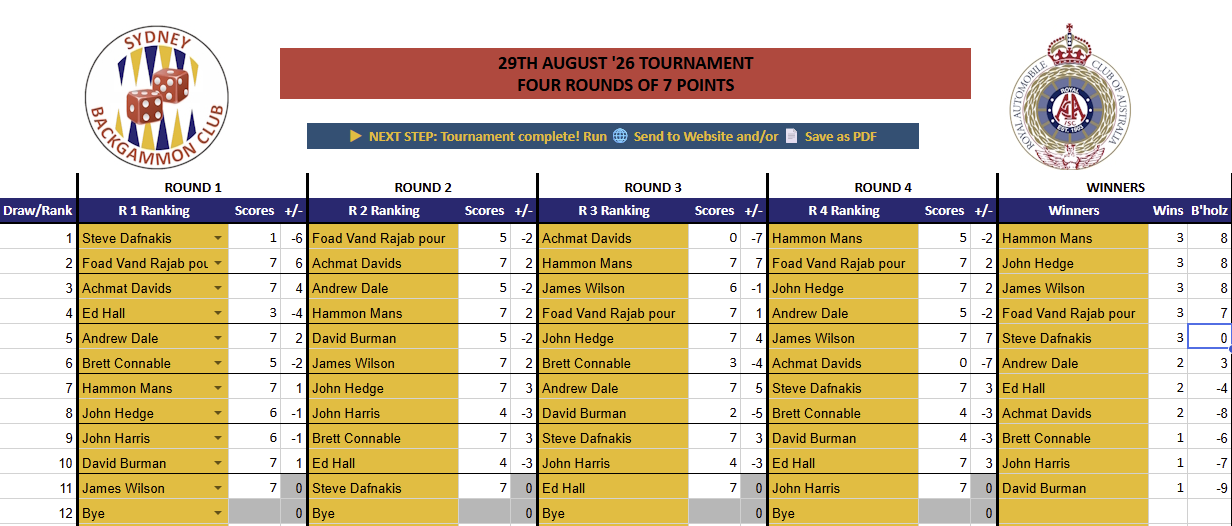
After Sort Winners, the standings showed three players all on 3 wins and +8 differential — a genuine three-way tie that wins and differential alone could not resolve:
Before Buchholz — three players tied on 3 wins / +8:
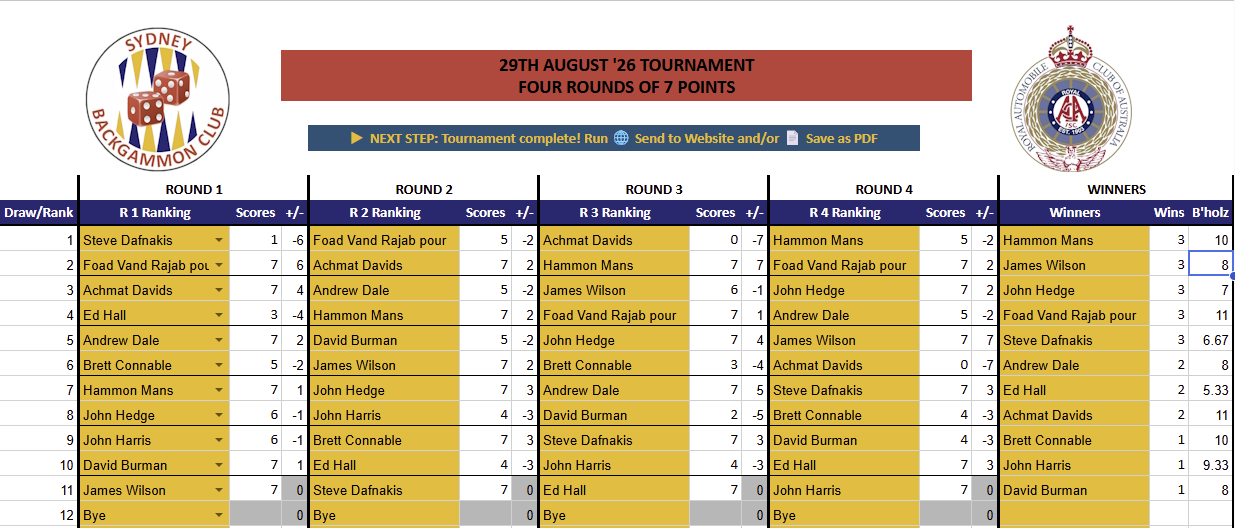
The director clicked Yes to apply Buchholz. The system calculated each tied player’s score by looking up who they played and how many wins those opponents finished with:
| Player | Opponents (final wins) | Buchholz |
|---|---|---|
| Hammon Mans | John Hedge (3) + Andrew Dale (2) + Achmat Davids (2) + Foad Vand Rajab pour (3) | 10 |
| James Wilson | Bye (avg sub: 2) + David Burman (1) + Foad Vand Rajab pour (3) + Achmat Davids (2) | 8 |
| John Hedge | Hammon Mans (3) + John Harris (1) + Brett Connable (1) + Andrew Dale (2) | 7 |
Hammon Mans faced the strongest field and wins the tiebreak. James Wilson received a bye in Round 1 — the system substituted 2 (the average of his other three opponents’ wins) for that round, placing him second. John Hedge faced the weakest set of opponents among the three and places third.
After Buchholz — column Y renamed to B’holz, scores displayed, players correctly ordered:
What About Players Outside the Tie?
Notice that Foad Vand Rajab pour also finished on 3 wins but with a differential of +7 (not +8). Because his differential differed from the tied three, he was already separated by the second tiebreaker and Buchholz did not affect his position. However his Buchholz score of 11 — higher than Hammon’s 10 — is correctly shown in the B’holz column. This is not an error: Foad happened to play three players who all finished on 3 wins (Hammon, James and Steve Dafnakis), giving him the toughest schedule in the field. He was just one point of differential short of sharing first place. Had his margin against any one of those opponents been one point greater, his differential would have been +8 and Buchholz would have put him first outright.
Once a tournament is complete, the system can produce a results file (CSV) for the ANZBGF national ratings at results.anzbgf.org. The file is saved to Google Drive for you to upload — nothing is sent automatically, so you always get a chance to check it first.
- With the completed tournament sheet open, click 🏆 Swiss Tournament menu → 📤 Export ANZBGF CSV.
- If prompted, complete the Google permissions authorisation (see Section 2) — the export needs Drive access to save the file.
- Enter the tournament date when asked, in YYYY-MM-DD format — e.g. 2026-09-06. Leave the box blank to use the first Saturday of the current month.
- The system saves a file named ANZBGF_[date].csv in the same Drive folder as the tournament sheet, and shows a summary: how many matches were written, any rows skipped, and the full list of player names in the file.
- Upload that CSV at results.anzbgf.org.
12Troubleshooting
| Problem | Solution |
|---|---|
| Don’t know what to do next | Click ▶ What’s Next? or read the status bar at the top of the sheet. |
| Player missing from dropdown | Check Members sheet for the name and any blank rows. Run 🔄 Refresh Player Dropdowns. |
| Two players paired who already played | If not flagged red, the draw is clean. If a red-flagged rematch is unavoidable and you want a different pairing, use ✏️ Manual Sort to drag players into a valid order before re-running the round. |
| Draw setup dialog didn’t appear when the sheet opened | The sheet may have been opened before — the dialog only appears once. Close the sheet, clear cell Z17 (unhide Column Z, delete the value in Z17, rehide), then reopen. |
| Rank draw Column B shows 1500 for all players | Column B is filled when Round 1 is run, not when names are entered. If all players show 1500, check that the ANZBGF Ranking column (D) in the Members sheet has ratings entered. Players with no rating are correctly seeded at 1500 (Section 3). |
| Column B has wrong numbers for a straw draw | For a straw draw, Column B must be filled manually by the director — the system does not generate numbers. Enter each player’s token number from the bag draw. |
| Buchholz scores look wrong | Buchholz is calculated from the pair-sum columns which record who played whom. If scores were entered incorrectly and corrected after the fact, re-run the Calculate Wins functions before running Sort Winners again. |
| Duplicate player error when running Round 1 | A player name appears more than once in Column D. Check for duplicates, remove the extra entry, and run Round 1 again. |
| Ran the wrong function | For Round 4: use 🗑️ Clear Round 4. For earlier rounds: File → Version history → See version history to restore. |
| Sheet looks wrong after two devices | Avoid having the sheet open on more than one device simultaneously. Use version history to restore if needed. |
| Google permissions popup appeared again | Normal for a new sheet or account. Follow the authorisation steps in Section 2. |
| Columns look wrong | Run 🙈 Hide Columns to restore standard view, or 👀 Unhide Columns to show all columns. |
| Score entered incorrectly | Simply retype the correct score in the cell, then re-run the Calculate +/- and Calculate Wins functions for that round. |
| Player name has a typo in Column D | Click the cell and select the correct name from the dropdown. Re-run the Round function to regenerate pairings if the round has already been run. |
| ANZBGF export created a duplicate player at 1500 | A name that doesn’t match the spelling on results.anzbgf.org exactly registers as a new player at 1500. Check the name list shown in the export summary, correct the spelling in the Members sheet, and re-run 📤 Export ANZBGF CSV before uploading. |
| Export ANZBGF CSV won’t run or is missing | Re-authorise Drive access (Section 2). If the menu item is absent, the sheet’s SwissEngine library needs updating to the current version — contact the Tournament Director. |
| Send to Website not working | Check internet connection. Ensure Sort Winners or a sort function has been run so Column W has data. Try again. SBC ONLY |
| PDF save fails | Ensure you have sufficient Google Drive storage. Check the script has Drive permissions (re-authorise if needed). |